


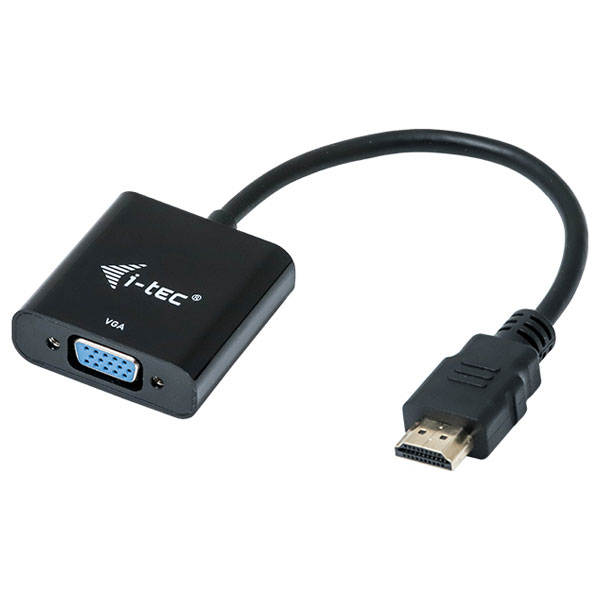
HDMI to VGA Cable Adapter for External Monitors
 Lowest tracked
Best price today
£12.55−17%£15.10
Lowest price at GamingKit
Lowest price we've trackedPrice check: we checked 5,000+ UK shops and found it at 4 shops.
Get this deal at GamingKit →We may earn a commission if you buy through shop links on this page, at no extra cost to you. It never changes the prices or their order. How we make money
Waiting for Cyber Monday?
Let Shopperazzi watch the price for you
Will it be cheaper on Cyber Monday?
· Sign in
My feed is your own page on Shopperazzi: every price drop, offer and code from what you follow, newest first. Follow a product, a brand or a shop. Free, no sign-up.
Compare 4 shops
Price history
Tracked since 24th Oct 2026✓ Lowest price we've tracked — good time to buyLowest we've tracked: £12.55
About this product
Easily connect an external VGA monitor to your computer or laptop using the HDMI port with this i-tec cable adapter. It supports resolutions up to Full HD 1920 x 1080 pixels, making it ideal for extending your desktop space for work or entertainment. Setup is straightforward: simply plug the adapter into your device's HDMI port and connect your VGA display. The adapter installs drivers automatically, allowing for instant use.
This adapter features a 15 cm cable and a gold-plated HDMI connector for reliable signal transfer. It's compatible with any device featuring an HDMI output, providing a simple solution for adding a VGA display.
- Connects VGA displays to HDMI sources
- Supports resolutions up to 1920 x 1080 pixels (Full HD)
- Automatic driver installation for easy setup
- 15 cm cable length with gold-plated HDMI connector
The i-tec HDMI to VGA Cable Adapter for External Monitors is stocked by 4 shops we compare on Shopperazzi. Listed prices start at £12.55 and go up to £15.99.
Product details
- Brand
- i-tec
- MPN
- HDMI2VGAADA
- GTIN
- 08595611702747
- Condition
- New
- Category
- Default Category>PC Components>Cables & Adaptors>Video Adapters
Frequently asked questions
What resolution does this i-tec HDMI to VGA Cable Adapter support?
This i-tec HDMI to VGA Cable Adapter supports resolutions of up to 1920 x 1080 pixels, which is Full HD.
How do I connect a VGA monitor using this adapter?
To use the i-tec HDMI to VGA Cable Adapter, plug it into the HDMI port of your computer and connect your VGA display to the adapter's VGA connector.
Does this adapter require any software installation?
No, the driver for the i-tec HDMI to VGA Cable Adapter is installed automatically from the system, allowing for instant use.
More from i-tec
Similar products